Server
The server operating system is Microsoft Windows Server 2019 Standard with the following features:
- System Name: SDE-GPLA01P
- IP: 172.16.110.118
- RAM: 24.0 GB
- Drive C: 64 GB for the operating system
- Drive D: 24 GB for applications
Note
The installation and correct functioning of the server are the responsibility of the Calzedonia EDP service
HTTP Server
The HTTP service is provided by an Apache HTTP server.
The current version is 2.4.58.
The installation directory is "d:\Program Files\Apache Software Foundation\Apache 2.4".
The server redirects each application to the corresponding server based on the URL using binary and proprietary AJP protocol.
Note
The installation and configuration of the Apache HTTP server are the responsibility of Giplo
WEB Server
The Web Appplication service is provided by an Apache Tomcat server.
The current version is 9.0.16.
The installation directory is "d:\Program Files\Apache Software Foundation\Tomcat 9.0".
Tip
Several instances of Tomcat are installed on the server, one for each application.
The instance used by ReportPPM is installed in "d:\WWW\Tomcat-ReportPPM ".
Note
The installation and configuration of the Apache Tomcat server are the responsibility of Giplo
Graphical User Interface
The application is developed with a web interface, therefore used via a browser. Compatibility with the most modern browsers has been tested.
Actually the pages are .jsp(Java servlet page). With this technology it is possible to modify dinamically the content of the page based on information that is only available on the server side, for example the roles.
The page is created in HTML5 with Javascript and CSS development, additional packages facilitate native development.
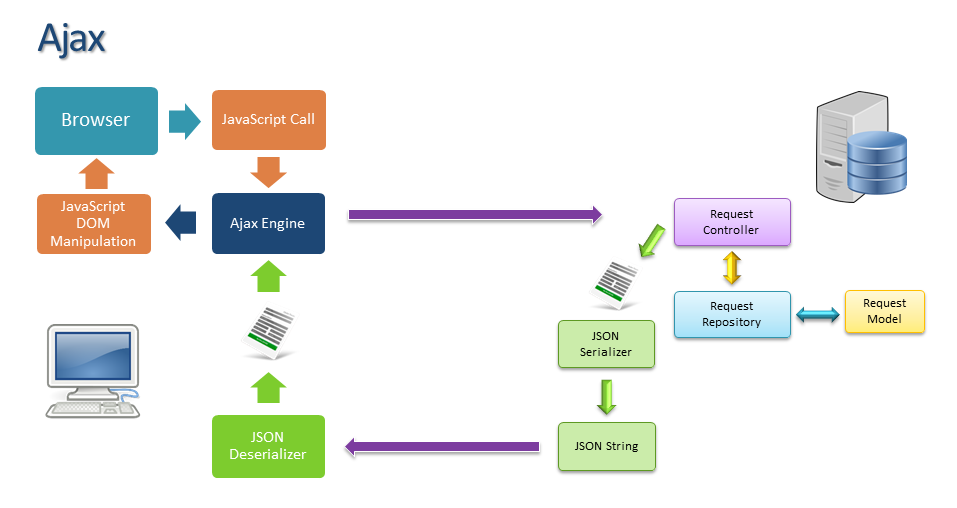
The application is developed with Ajax technology, a software development technique for the creation of interactive web applications, based on a background exchange of data between web browsers and servers, thus allowing the dynamic updating of a web page without explicit reloading by the user.
The web client takes care of managing the user interface without having direct access to the data. When data is needed on the page, the customer makes an asynchronous call, sending only the request parameters and waiting for the request without blocking interactivity with the page. The server processes the data and returns the object in string format via serialization in JSON format.
This technique allows you to improve the user experience and minimize data traffic, as it is not necessary to reload the entire page for each operation.
The languages or framework used to create the pages are:
| jQuery |
The component allows the development of Javascript procedures using a higher level language and compatibility with different browsers. |
| Bootstrap |
The most popular framework in the world for creating responsive and mobile-first sites. |
| Kendo UI |
Kendo UI is a comprehensive HTML5 user interface framework for building interactive and high-performance websites and applications. |
| Font Awesome |
Set of icons for web applications. |
Note
Kendo is the only commercial package used to develop the page, It is developed by Progress and licensed by Giplo.
Its use is free for the end user.
Application Server
The web server layer is built in Java and hosted on a Tomcat container.
Its functions are:
- Real-time compilation of jsp pages
- Answering Ajax calls
- Development of the business model
- Access to data
- Return of processed data in JSON format to the page
| Java |
Java is the most used server-side programming language in the world. It reduces costs, shortens development times, promotes innovation and improves application services. With millions of developers running more than 51 billion Java Virtual Machines worldwide, Java continues to be the development platform of choice for businesses and developers.. |
| Tomcat |
It is the container that allows the creation of JSP pages and the execution of Java procedures.
The Apache Tomcat software is developed in an open environment and released with the Apache version 2 license |
| Shiro |
It is a powerful and easy-to-use Java security framework that performs authentication, authorization, encryption and session management. |
Note
All components of this level are Open Source and free
Data Access
The data is stored and is a SAP HANA technology database.
Access is done via JDBC drivers provided by SAP.
Ad hoc views have been developed in the database for the application.
Note
The server can be reached at the address: sde-sxr2d01.csg1.sys.calzedonia.com (172.16.145.189:30015).
The default schema for the application is "giplo"
Login LDAP
The application uses an LDAP login for authentication.
The login URL is: ldap://sde-nslb-ldapad01p.csg1.sys.calzedonia.com:389
The connection to the ldap server is made with the user: gpla01p
The search paths for user authentication are:
- ou=CSG1,dc=csg1,dc=sys,dc=calzedonia,dc=com
- ou=External,dc=csg1,dc=sys,dc=calzedonia,dc=com
- ou=SalesPeople,dc=csg1,dc=sys,dc=calzedonia,dc=com
Warning
The connection uses an insecure protocol.
Login OKTA
Danger
There is currently no plan to migrate the login function using the Okta provider.
Shop schedule
The report provides information on activities planned in shops.
The program accesses the data using the view PPM_SCHEDULE in the giplo schema:
CREATE VIEW PPM_SCHEDULE AS
SELECT
	PPM_WIP.WIP_TYPE_DESCR AS wipType,
	PPM_WIP.RENEWAL_TYPE_DESCR AS typeOfRemake,
	PPM_WIP.SAP_CODE AS sapCode,
	PPM_WIP.LEASING AS leasing,
	PPM_WIP.SHOP_DESCR AS shopDescription,
	PPM_WIP.BRAND AS idBrand,
	PPM_WIP.COUNTRY AS idCountry,
	PPM_WIP.LOCALIZATION AS localization,
	PPM_WIP.MANAGEMENT_TYPE_DESCR AS management,
	PPM_WIP.COMM_FLAG_STORE AS commercialFlagship,
	PPM_WIP.FRANCH_FLAG_STORE AS franchisingFlagship,
	PPM_WIP.SURVEY AS survey,
	PPM_WIP.PROJ_DLV_DATE AS projectDelivery,
	PPM_WIP.PREM_LV_DATE AS premisesDelivery,
	PPM_WIP.START_WORK_DATE AS startWork,
	PPM_WIP.SHIP1_DEPARTURE AS firstShipmentDeparture,
	PPM_WIP.SHIP1_DLV_DATE AS firstShipmentDelivery,
	PPM_WIP.SHIP1_DLV_HOUR AS firstShipmentDeliveryTime,
	PPM_WIP.SHIP2_DEPARTURE AS secondShipmentDeparture,
	PPM_WIP.SHIP2_DLV_DATE AS secondShipmentDelivery,
	PPM_WIP.SHIP2_DLV_HOUR AS secondShipmentDeliveryTime,
	PPM_WIP.SHIP3_DEPARTURE AS thirdShipmentDeparture,
	PPM_WIP.SHIP3_DLV_DATE AS thirdShipmentDelivery,
	PPM_WIP.SHIP3_DLV_HOUR AS thirdShipmentDeliveryTime,
	PPM_WIP.END_WORK_DATE AS endOfWork,
	PPM_WIP.REOPEN_DATE AS reopening,
	PPM_WIP.PRJ_MANAGER AS idProjectManager,
	PPM_WIP.PRJ_MANAGER_DESCR AS projectManager,
	PPM_WIP.DESIGNER AS idDesigner,
	PPM_WIP.DESIGNER_DESCR AS designer,
	PPM_WIP.TECH_COORDINATOR AS idTechnicalCoordinator,
	PPM_WIP.TECH_COORDINATOR_DESCR AS technicalCoordinator,
	PPM_WIP.SQM_TOT_SELL_AREA AS sellingArea,
	PPM_WIP.FURN_TYPE_DESCR AS furnishing,
	PPM_WIP.SHIP1_DLV_LIST AS firstDeliveryList,
	PPM_WIP.SHIP2_DLV_LIST AS secondDeliveryList,
	PPM_WIP.SHIP3_DLV_LIST AS thirdDeliveryList
FROM
	SAPSR3.ZPPM_WIP_EXV AS PPM_WIP
WHERE PPM_WIP.WIP_TYPE <> '04' AND
	PPM_WIP.WIP_TYPE <> '06' AND
	PPM_WIP.WIP_TYPE <> '07'  AND
	PPM_WIP.WIP_TYPE <> '12' AND
	PPM_WIP.STATUS = 'Z011';
Information on dates and contact persons is provided:
- Project Manager
- Designer
- Technical Coordinator
- 1 Shipment Departure
- 2 Shipment Departure
- 3 Shipment Departure
- End Of Work
- Reopening
The report can be exported in Excel or PDF format with the specific buttons.
Note
The report in Excel is produced in JavaScript using a native functionality of the Kendo component.
The report in PDF is produced using Java code and the Java iText component (AGPL-version).
The PDF report shows information grouped by week.
Note
The row has a green background if "sellingArea" is greater than 0 and "furnishing" is not blank.
The row has a yellow background if "firstDeliveryList" or "secondDeliveryList" or "thirdDeliveryList" is equal to "X".
Report for countries
The program accesses the data using the view PPM_OPEN_STORE in the giplo schema:
CREATE VIEW PPM_OPEN_STORE  AS
SELECT
    count(EXTERNAL_ID) AS count,
	COUNTRY AS idCountry,
	COUNTRY_DESCR AS country,
	MANAGEMENT_TYPE AS IDMANAGEMENT,
	MANAGEMENT_TYPE_DESCR AS MANAGEMENT,
	BRAND AS idBrand,
	BRAND_DESCR AS brand
FROM
    SAPSR3.ZPPM_STORE_EXV WHERE STATUS = 'Z014' AND
	SHOP_TYPE <> 'IBS'
	GROUP BY COUNTRY,
	COUNTRY_DESCR,
	MANAGEMENT_TYPE,
	MANAGEMENT_TYPE_DESCR,
	BRAND,
	BRAND_DESCR
	ORDER BY COUNTRY_DESCR, MANAGEMENT_TYPE, BRAND_DESCR;
This report shows the open shops for each brand.
Note
Data is grouped, filtered and sorted using Java stream functions.
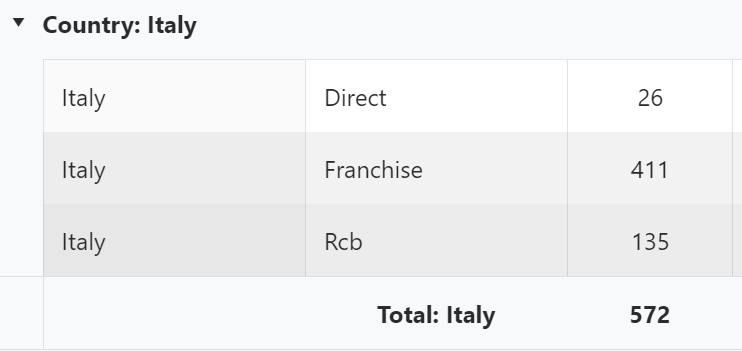
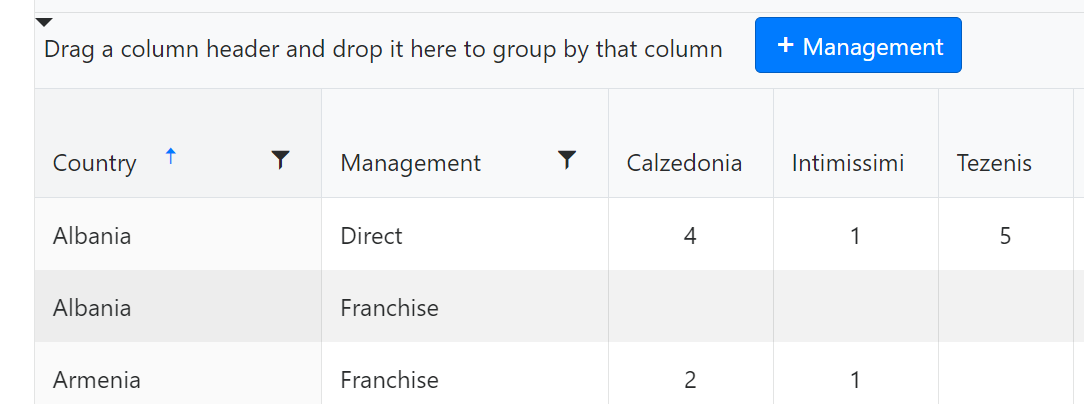
The shops are grouped by country and types of management.
You can remove the grouping and get a flat table.
You can also group by Management by dragging the corresponding column.
The report can be exported in Excel or PDF format with the specific buttons.
Note
The report in Excel is produced in JavaScript using a native functionality of the Kendo component.
The report in PDF is produced using Java code and the Java iText component (AGPL-version).
Tip
The content of the exported report depends on the sorting, grouping and filtering selections set on the web page.
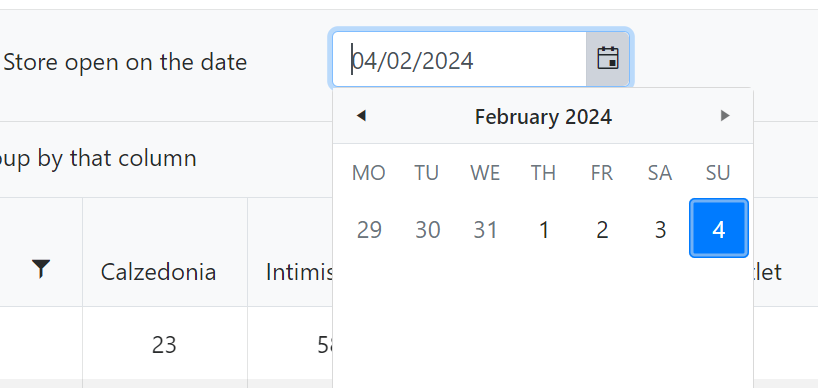
You can view data for any date in the past.
Report Planning
Tip
The report has no graphical user interface, but can be obtained as an Excel sheet with the green button from the Report for countries action bar.
Note
The planning button creates an Excel sheet whose characteristics have been set by the specific Calzedonia department.
The program accesses the data using the view PPM_OPEN_STORE_WIP in the giplo schema:
CREATE VIEW PPM_OPEN_STORE_WIP AS
SELECT * FROM (
SELECT
	PPM_STORE.EXTERNAL_ID,
	PPM_WIP.STATUS AS STATUS,
	PPM_STORE.COUNTRY AS idCountry,
	PPM_STORE.COUNTRY_DESCR AS country,
	PPM_STORE.MANAGEMENT_TYPE AS idMANAGEMENT_STORE,
	PPM_STORE.MANAGEMENT_TYPE_DESCR AS MANAGEMENT_STORE,
	PPM_STORE.BRAND AS idBrand,
	PPM_STORE.BRAND_DESCR AS brand,
	PPM_STORE.ACTUAL_START,
	PPM_STORE.ACTUAL_FINISH,
	PPM_WIP.WIP_TYPE AS wipType,
	PPM_WIP.WIPSTARTINGDATE,
	PPM_WIP.WIPFINISHDATE,
	PPM_WIP.MANAGEMENT_TYPE  AS idMANAGEMENT,
	PPM_WIP.MANAGEMENT_TYPE_DESCR  AS MANAGEMENT,
	PPM_STORE.SHOP_TYPE AS SHOP_TYPE
FROM
	SAPSR3.ZPPM_STORE_EXV AS PPM_STORE
INNER JOIN
	SAPSR3.ZPPM_RELATION_DB AS PPM_RELATION
ON
	(PPM_STORE.GUID = PPM_RELATION.GUID_A)
INNER JOIN
	SAPSR3.ZPPM_WIP_EXV AS PPM_WIP
ON
	(PPM_RELATION.GUID_B = PPM_WIP.GUID)
UNION
SELECT
	PPM_STORE.EXTERNAL_ID,
	PPM_WIP.STATUS AS STATUS,
	PPM_STORE.COUNTRY AS idCountry,
	PPM_STORE.COUNTRY_DESCR AS country,
	PPM_STORE.MANAGEMENT_TYPE AS idMANAGEMENT_STORE,
	PPM_STORE.MANAGEMENT_TYPE_DESCR AS MANAGEMENT_STORE,
	PPM_STORE.BRAND AS idBrand,
	PPM_STORE.BRAND_DESCR AS brand,
	PPM_STORE.ACTUAL_START,
	PPM_STORE.ACTUAL_FINISH,
	PPM_WIP.WIP_TYPE AS wipType,
	PPM_WIP.WIPSTARTINGDATE,
	PPM_WIP.WIPFINISHDATE,
	PPM_WIP.MANAGEMENT_TYPE  AS idMANAGEMENT,
	PPM_WIP.MANAGEMENT_TYPE_DESCR  AS MANAGEMENT,
	PPM_STORE.SHOP_TYPE AS SHOP_TYPE
FROM
	SAPSR3.ZPPM_STORE_EXV AS PPM_STORE
INNER JOIN
	SAPSR3.ZPPM_RELATION_DB AS PPM_RELATION
ON
	(PPM_STORE.GUID = PPM_RELATION.GUID_B)
INNER JOIN
	SAPSR3.ZPPM_WIP_EXV AS PPM_WIP
ON
	(PPM_RELATION.GUID_A = PPM_WIP.GUID))
WHERE STATUS = 'Z012' AND SHOP_TYPE <> 'IBS'

ORDER BY
	EXTERNAL_ID ASC, WIPSTARTINGDATE DESC
The spreadsheet has a tab for each company brand, each tab has 46 columns
Note
The data is processed using Java code and the spreadsheet is produced using the Apache POI component.
Report Gantt
The program accesses the data using the view PPM_OPEN_GANTT in the giplo schema:
CREATE VIEW PPM_OPEN_GANTT AS
SELECT
	PPM_WIP.WIP_TYPE_DESCR AS wipType,
	PPM_WIP.SAP_CODE AS sapCode,
	PPM_WIP.SHOP_DESCR AS shopDescription,
	PPM_WIP.BRAND AS idBrand,
	PPM_WIP.COUNTRY AS idCountry,
	PPM_WIP.MANAGEMENT_TYPE_DESCR AS management,
	PPM_WIP.SURVEY AS survey,
	PPM_WIP.PROJ_DLV_DATE AS projectDelivery,
	PPM_WIP.PREM_LV_DATE AS premisesDelivery,
	PPM_WIP.START_WORK_DATE AS startWork,
	PPM_WIP.SHIP1_DEPARTURE AS firstShipmentDeparture,
	PPM_WIP.SHIP1_DLV_DATE AS firstShipmentDelivery,
	PPM_WIP.SHIP1_DLV_HOUR AS firstShipmentDeliveryTime,
	PPM_WIP.SHIP2_DEPARTURE AS secondShipmentDeparture,
	PPM_WIP.SHIP2_DLV_DATE AS secondShipmentDelivery,
	PPM_WIP.SHIP2_DLV_HOUR AS secondShipmentDeliveryTime,
	PPM_WIP.SHIP3_DEPARTURE AS thirdShipmentDeparture,
	PPM_WIP.SHIP3_DLV_DATE AS thirdShipmentDelivery,
	PPM_WIP.SHIP3_DLV_HOUR AS thirdShipmentDeliveryTime,
	PPM_WIP.END_WORK_DATE AS endOfWork,
	PPM_WIP.REOPEN_DATE AS reopening,
	PPM_WIP.PRJ_MANAGER AS idProjectManager,
	PPM_WIP.PRJ_MANAGER_DESCR AS projectManager,
	PPM_WIP.DESIGNER AS idDesigner,
	PPM_WIP.DESIGNER_DESCR AS designer,
	PPM_WIP.TECH_COORDINATOR AS idTechnicalCoordinator,
	PPM_WIP.TECH_COORDINATOR_DESCR AS technicalCoordinator
FROM
	SAPSR3.ZPPM_WIP_EXV AS PPM_WIP
WHERE PPM_WIP.WIP_TYPE <> '04' AND
	PPM_WIP.WIP_TYPE <> '06' AND
	PPM_WIP.WIP_TYPE <> '07' AND
	PPM_WIP.STATUS = 'Z011';
The report provides information on the work progress of the shops in WIP (Work In Progress) status in Gantt format.
Data is displayed within two user-selectable dates.
The report can be exported in Excel or PDF format with the specific buttons.
Note
The report in Excel is produced in JavaScript using a native functionality of the Kendo component.
The report in PDF is produced using Java code and the Java iText component (AGPL-version).
Note
The report is mainly used for the PDF file where the color settings were specifically requested by Calzedonia staff.
The PDF report is divided into two parts. On the left side there is information about all the works in progress:
- Wip Type
- Sap Code
- Shop Description
- Brand
- Country
- Management
- Project Manager
- Designer
- Technical Coordinator
All the significant dates of the project are also reported
- Survey (S)
- Project Delivery (P)
- Premises Delivery (H)
- Start Work (W)
- 1 Shipment Departure
- 1 Shipment Delivery (1)
- 2 Shipment Departure
- 2 Shipment Delivery (2)
- 3 Shipment Departure
- 3 Shipment Delivery (3)
- End Of Work (E)
- Reopening (O)
Tip
Each date column is highlighted with a different color.
Note
The two sections are separated by the Total Working Days column (number of days between Start Work and End Of Work).
On the right side all days between the selected dates are shown.
Saturday and Sunday are highlighted in light blue.
If a date on the left side is present in the date range on the right side, the relevant cell is highlighted with the corresponding color and abbreviation.
If there are multiple dates in the same cell it is highlighted in black and all abbreviations are shown.
Tip
The dates on the right side between Start Work and End Of Work are highlighted in yellow.
Report WIP
The program accesses the data using the view PPM_OPEN_WIP in the giplo schema:
CREATE VIEW PPM_OPEN_WIP AS
SELECT
	PPM_WIP.EXTERNAL_ID AS idWip,
	PPM_WIP.WIP_TYPE_DESCR AS wipType,
	PPM_WIP.RENEWAL_TYPE_DESCR AS typeOfRemake,
	PPM_WIP.SAP_CODE AS sapCode,
	PPM_WIP.SHOP_DESCR AS shopDescription,
	PPM_WIP.BRAND AS idBrand,
	PPM_WIP.COUNTRY AS idCountry,
	PPM_WIP.MANAGEMENT_TYPE_DESCR AS management,
	PPM_WIP.SURVEY AS survey,
	PPM_WIP.PROJ_DLV_DATE AS projectDelivery,
	PPM_WIP.PREM_LV_DATE AS premisesDelivery,
	PPM_WIP.START_WORK_DATE AS startWork,
	PPM_WIP.SHIP1_DEPARTURE AS firstShipmentDeparture,
	PPM_WIP.SHIP1_DLV_DATE AS firstShipmentDelivery,
	PPM_WIP.SHIP1_DLV_HOUR AS firstShipmentDeliveryTime,
	PPM_WIP.SHIP2_DEPARTURE AS secondShipmentDeparture,
	PPM_WIP.SHIP2_DLV_DATE AS secondShipmentDelivery,
	PPM_WIP.SHIP2_DLV_HOUR AS secondShipmentDeliveryTime,
	PPM_WIP.SHIP3_DEPARTURE AS thirdShipmentDeparture,
	PPM_WIP.SHIP3_DLV_DATE AS thirdShipmentDelivery,
	PPM_WIP.SHIP3_DLV_HOUR AS thirdShipmentDeliveryTime,
	PPM_WIP.END_WORK_DATE AS endOfWork,
	PPM_WIP.REOPEN_DATE AS reopening,
	PPM_WIP.PRJ_MANAGER AS idProjectManager,
	PPM_WIP.PRJ_MANAGER_DESCR AS projectManager,
	PPM_WIP.DESIGNER AS idDesigner,
	PPM_WIP.DESIGNER_DESCR AS designer,
	PPM_WIP.TECH_COORDINATOR AS idTechnicalCoordinator,
	PPM_WIP.TECH_COORDINATOR_DESCR AS technicalCoordinator,
	TIMELINE_DB.TECH_NOTES AS technicalNotes
FROM
	SAPSR3.ZPPM_WIP_EXV PPM_WIP
INNER JOIN
	SAPSR3.ZPPM_TIMELINE_DB TIMELINE_DB
ON
	(PPM_WIP.GUID = TIMELINE_DB.GUID)
WHERE PPM_WIP.WIP_TYPE <> '04' AND
	PPM_WIP.WIP_TYPE <> '07' AND
	PPM_WIP.STATUS = 'Z011';
The report provides information on the work progress of the shops in WIP (Work In Progress) status in Table format.
All data is displayed regardless of date.
The report can be exported in Excel or PDF format with the specific buttons.
Note
The report in Excel is produced in JavaScript using a native functionality of the Kendo component.
The report in PDF is produced using Java code and the Java iText component (AGPL-version).
Note
The PDF report is then exported with or without information on the third shipment.